

Build a reusable skill check#
A reusable skill check reads its threshold from Script metadata. You can use the same Condition to test whether the player is strong enough to move a boulder or enter a tournament, changing only the number in the Script.
Before you begin#
Create a Script and a Compendium. The Compendium must be visible to the Dialogue component that runs the Script. This example also assumes that the Stats module defines the player's Strength Attribute.
Pass the threshold#
Add a compare metadata value to the @if line. The value represents the minimum Strength required by this branch:
@if strength-check [compare:8]
  Narrator: You push the boulder aside with incredible strength.
@else
  Narrator: You try to push the boulder, but it is too heavy.
The Script calls the strength-check Condition and exposes 8 as the active line's compare metadata.
Create the Condition#
- Open the Compendium and add a Condition named
strength-check. - Add a Compare Numbers Condition.
- Read the player's Strength for the first value.
- Select the numeric Active Line Metadata Signal for the second value.
- Set Dialogue to Last Dialogue Started and Metadata to
compare. - Set Compare to Greater Or Equal.
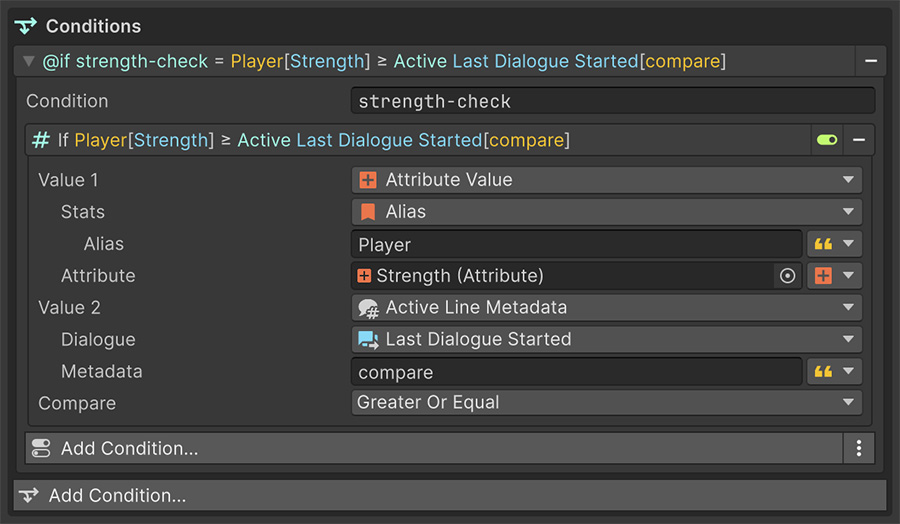
The Condition reads metadata from the Dialogue's current line. If the compare key is missing, the numeric Signal returns 0.
Verify the result#
Run the Script with the player's Strength below 8, then at or above 8. The first run follows @else; the second runs the success branch.
Now reuse the Condition for a tougher check by changing the metadata value:
@if strength-check [compare:12]
  Guard: You may enter the tournament.
@else
  Guard: Return when you are stronger.
With compare set to 12, the same Condition now requires at least 12 Strength to enter the tournament.
Where to go next#
- Metadata — pass Boolean, numeric, and string values from a Script.
- Conditions — define named checks in a Compendium.
- Scripts — override built-in settings and create custom metadata keys.